You bought a VPS. You have an IP address, a login, and a server that is running. How does your website get from there to someone’s browser?
Let’s follow one WordPress page. You will see where its files live, what PHP does, why it needs a database, and how a working server can still have a broken website.
A VPS runs the software that receives a visitor’s request and returns your website. For a typical WordPress page, the web server passes work to PHP. WordPress reads the content it needs from a database, builds an HTML response, and sends it back. The browser then requests images, styles, and scripts to display the page.
- 🧩 A VPS is the starting point
- 🌐 What happens when someone opens a page?
- The browser finds the destination
- The web server receives the request
- PHP runs WordPress
- WordPress asks for stored content
- The browser puts the page together
- 📁 Where does the website actually live?
- Files on storage
- Records in the database
- 🖼️ Follow one image from WordPress to the page
- 1. The media library
- 2. The image details
- 3. The image on the website
- ⚡ What do Nginx, PHP, and the database each do?
- Nginx or Apache
- PHP
- MySQL or MariaDB
- The browser
- 🧠 Where CPU, RAM, and storage come in
- 🔍 The server is running. Why is the site down?
- 🧪 See the separate requests yourself
- 💬 A few questions worth clearing up
- Your website is a set of working parts
- Choose your next step
🧩 A VPS is the starting point
A basic VPS usually gives you an operating system and access to it. It does not necessarily include WordPress, a web server, or a finished website. A hosting image, control panel, or managed service may set up some of these for you.
For this example, imagine a small Linux VPS running WordPress, with the web server, PHP, and database all on the same machine.
| Part | Its job | Example |
|---|---|---|
| Operating system | Runs the services and manages the server’s resources. | Linux |
| Web server | Accepts web requests and serves files or passes work to PHP. | Nginx or Apache |
| PHP runtime | Executes the WordPress application code. | PHP, often through PHP-FPM |
| Database | Stores posts, settings, users, and other structured records. | MySQL or MariaDB |
| Website files | Provide the application code, themes, plugins, and uploads. | WordPress files on storage |
| Domain and HTTPS | Give visitors a name to use and an encrypted connection. | DNS records and a valid TLS certificate |
🌐 What happens when someone opens a page?
Suppose a visitor opens a WordPress article. This is the main application path when a saved page response is not already available from a cache.
The database returns data to WordPress. PHP builds the response, which travels back through the web server to the browser. The database does not send the finished page directly to the visitor.
The browser finds the destination
DNS helps the browser find an address for the domain. The browser connects to the site, usually over HTTPS. A CDN or reverse proxy may sit between the visitor and your VPS.
The web server receives the request
Nginx or Apache checks which website should handle it. A request for an existing image can often be served directly. A request for a WordPress page is usually routed to the application, unless a cache can answer first.
PHP runs WordPress
WordPress loads the code it needs, including relevant theme and plugin code. It works out which page was requested and what content the response needs.
The visitor receives the result of this work. The browser does not need PHP installed.
WordPress asks for stored content
WordPress may query MySQL or MariaDB for the article, site settings, navigation, and other records. Some of this information may already be cached.
The browser puts the page together
The HTML response describes the page. The browser requests the images, CSS, fonts, and JavaScript it needs, then draws the result on screen. Some of these files may already be in the browser’s own cache.
Does every visit run PHP and query the database?
No. A page cache can return a previously generated response. A CDN may serve that response without reaching your VPS. Other caches can reduce database work while PHP still runs. Logged-in pages and personalised content often need different cache rules.
📁 Where does the website actually live?
A typical WordPress website has two main parts to preserve: its files and its database. They contain different things.
Files on storage
WordPress core, themes, plugins, uploaded images, and configuration files.
The files provide the code and media used by the website.
Records in the database
Post content, page titles, users, settings, comments, and information about uploaded media.
WordPress reads these records when it builds a response.
A page you write in the WordPress editor is normally stored as
database content. It does not usually become a separate
about.html file on your server.
An uploaded photograph is different. In a standard local-media setup, the image file goes into the uploads directory. WordPress also stores an attachment record and related metadata in the database.
/var/www/example.com/public/wp-content/uploads/2026/10/photo.jpg
An illustration, not a universal location. Your installation’s
directory and upload settings may be different.
Is a file path the same as an image URL?
A server path tells the operating system where a file lives. A URL tells the browser where to request it. Web server rules connect public URLs to files or application routes.
A public URL might look like
https://example.com/wp-content/uploads/2026/10/photo.jpg.
It does not reveal the full server directory shown above.
🖼️ Follow one image from WordPress to the page
These screenshots show three views of the same publishing process: choosing media, checking its details, and seeing it on a public page.
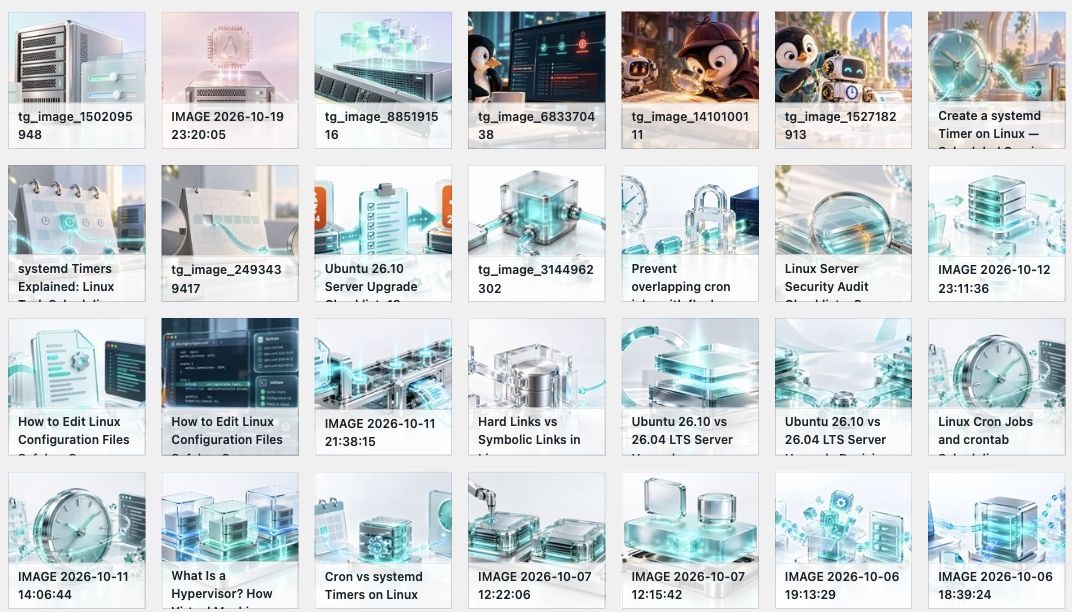
1. The media library
The WordPress media library is a convenient view of your uploads. It shows attachment records and previews so you can find and reuse a picture without browsing server directories.
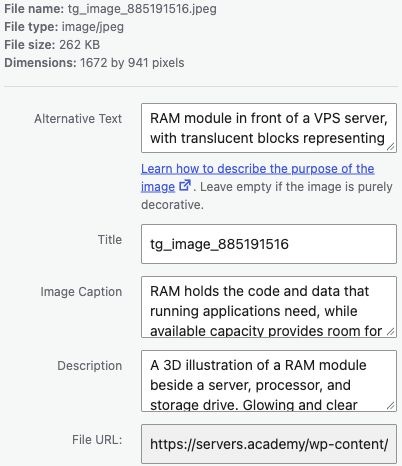
2. The image details
The attachment screen shows information such as the file name, dimensions, alternative text, and file URL. These fields describe or identify the image; they are separate from its pixels.
3. The image on the website
The page includes an image reference. The browser uses it to request an image file, then displays that file alongside the article. WordPress may offer several generated sizes so the browser can choose a suitable one.

⚡ What do Nginx, PHP, and the database each do?
You can run all three on one VPS, but each has a separate job. That separation matters when something breaks.
Nginx or Apache
Receives HTTP requests, serves static files, and routes application requests. It can also handle HTTPS and caching, depending on the setup.
PHP
Runs WordPress code. It processes application logic and helps generate responses using the theme, plugins, and stored content.
MySQL or MariaDB
Stores and retrieves structured records. WordPress uses these records for content, accounts, settings, and more.
The browser
Reads HTML, applies CSS, displays images, and runs client-side JavaScript. This work happens on the visitor’s device.
Does a plain HTML website need PHP and a database?
No. A static website can consist of HTML, CSS, JavaScript, and image files that a web server delivers directly. WordPress uses PHP and a database because it is an application for managing and generating content.
🧠 Where CPU, RAM, and storage come in
The services do not each belong to one hardware component. PHP, the database, and the web server all use a mix of resources.
| Resource | What it does here | A possible limit |
|---|---|---|
| ⚙️ CPU | Executes PHP, database operations, encryption, and other instructions. | Expensive requests or too many simultaneous tasks can keep the CPU busy. |
| 🧠 RAM | Holds active processes, application data, database buffers, and caches. | Memory pressure can cause heavy swapping, failed allocations, or terminated processes. |
| 💾 Storage | Keeps files, database data, and logs. Handles reads and writes. | Slow I/O or a full filesystem can delay or break operations. |
| 🌐 Network | Carries requests, responses, images, and other transferred data. | Limited throughput, packet loss, or high latency can slow delivery. |
A slow site does not automatically need a larger VPS. A large image, an expensive plugin, a database query, or a third-party script may be the actual cause. Measure the delay before buying more resources.
For sizing, see how much RAM a VPS needs and what a vCPU does .
🔍 The server is running. Why is the site down?
“Running” in your hosting panel usually means the virtual machine is powered on. A website depends on several services and connections inside and outside that machine.
You may be able to log in through SSH while the web server is stopped. Nginx may be running while PHP is unavailable. WordPress may load its code but fail to connect to the database.
| What you see | What it may involve | Where to start |
|---|---|---|
| Domain does not resolve | DNS records, delegation, or resolver problems. | Check the domain’s DNS records and nameservers. |
| Connection times out | Routing, firewall rules, or an unreachable service. | Check connectivity and whether the web service is reachable. |
| Certificate warning | An expired certificate, hostname mismatch, or trust problem. | Check the certificate presented for the exact hostname. |
| 502 Bad Gateway | A proxy did not receive a valid upstream response. | Read proxy logs and check the upstream service, such as PHP-FPM. |
| Database connection error | Database availability, connection settings, or access permissions. | Check database health and WordPress connection configuration. |
| 404 on a page or image | A missing resource, changed URL, or routing problem. | Check the requested URL, file location, and rewrite rules. |
| 500 Internal Server Error | An application or server-side failure. | Read the relevant error logs for the failed request. |
Can I test the website by opening the server’s IP address?
Sometimes, but it is not a reliable test of the full website. Several sites may share one IP address, and the web server uses the hostname to choose a site. HTTPS also needs a certificate that matches the name being requested.
An IP address may show a default page even when the domain works correctly, or work while the domain’s DNS is broken.
🧪 See the separate requests yourself
Open a public WordPress article in a desktop browser. You can inspect its requests without changing the website.
- Open your browser’s developer tools. Find the Network tab.
- Reload the page with the Network tab open. The browser lists the requests made during loading.
- Find the main document request. Inspect its response headers and HTML response. The response contains generated page markup, not the PHP source.
- Filter the list to images. Select an image request and inspect its URL, content type, and preview.
- Notice the other files. CSS, JavaScript, fonts, and images can arrive through separate requests, sometimes from different domains.
Browser tools reveal requests and responses. They do not directly show the PHP execution or database queries behind a page. Cached files may appear as served from memory or disk cache.
💬 A few questions worth clearing up
Is WordPress itself the web server?
WordPress is the application. Nginx or Apache handles web traffic, while PHP executes WordPress code. Hosting tools often install these together, which can make them feel like one product.
Do I need a separate VPS for the database?
A small site can run its web server, PHP, and database on one VPS. A separate database server is an architectural choice based on workload and operational needs, rather than a requirement for every WordPress site.
Will changing DNS upload my website?
No. DNS helps visitors find a destination. Your website files, database, and server configuration still need to be in place at that destination.
Does adding RAM fix a slow WordPress website?
It can help when memory is a demonstrated limit. It will not directly fix a broken DNS record, a missing image, inefficient application code, or a slow third-party service. Check the resource usage and request timings first.
What happens when I click Publish?
WordPress processes the editor’s request and saves the post’s content and publishing state in the database. Plugins may perform additional work, such as clearing caches. When a visitor requests the published URL, the site returns a response using that content.
Your website is a set of working parts
The VPS provides the computing environment. The web server receives requests. PHP runs WordPress. The database holds content and settings. Storage keeps the files. The browser turns the responses into a page.
Once you can follow that path, you can ask a much better troubleshooting question: which part stopped doing its job?