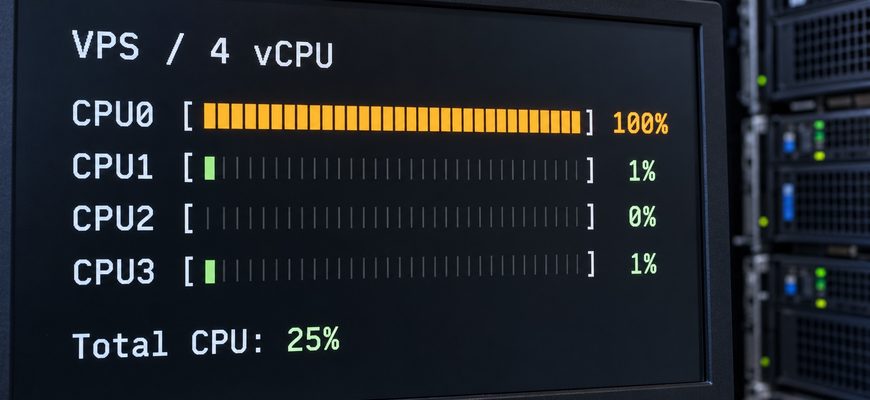
Your website is slow, but the VPS dashboard shows only 25% CPU usage. Before paying for more vCPUs, check whether that average is hiding one fully occupied software thread.
On a four-vCPU server, one thread can consume a full vCPU’s worth of processing time while the overall average remains near 25%. If the slow part of a request cannot run in parallel, the other three virtual processors cannot simply take over its work.
Look at individual CPUs and application threads while the slowdown happens. A busy thread can explain low average usage and slow responses. It is one possible cause: storage waits, database locks, memory pressure and external services can produce similar symptoms.
A vCPU is a virtual processor presented to a virtual machine. Its count describes potential processing concurrency; it does not guarantee speed or a dedicated physical core.
The cover is an illustrative monitoring scene, not a capture from a tested hosting provider. The numerical example below explains the arithmetic; the commands let you inspect your own Linux VPS.
Why a VPS can be CPU-limited at 25% overall usage
Consider an application doing one CPU-heavy calculation on one software thread. In this simplified example, the VM has four vCPUs, one is occupied and the rest are idle:
CPU0   100% busy
CPU1     0% busy
CPU2     0% busy
CPU3     0% busy

Overall average: 25%
(100 + 0 + 0 + 0) ÷ 4 = 25%. The average describes the whole VM. It does not show how much spare capacity the busiest thread can use.
Now suppose you move the same application to eight vCPUs with identical per-thread performance. If it still does the calculation on one thread, the overall average can fall to 12.5% without the calculation finishing any sooner.
| VM allocation | Busy threads | Overall average |
|---|---|---|
| 2 vCPUs | 1 | 50% |
| 4 vCPUs | 1 | 25% |
| 8 vCPUs | 1 | 12.5% |
Extra vCPUs can still help other requests or background jobs run alongside that calculation. They help throughput when there is independent work to run. They do not automatically shorten a serial step inside one request.
What is a vCPU, and is it a real core?
Your VPS runs on a physical host. A hypervisor schedules its virtual processors on the host’s CPU resources. Linux inside the VM sees those virtual processors; the hosting plan determines how they are backed and what CPU time is available. See how a VPS works for the underlying setup.
A physical CPU contains cores, and a core may expose multiple hardware threads through simultaneous multithreading (SMT). Those hardware threads share execution resources. A vCPU may be backed by a hardware thread or a full core, with shared or reserved access depending on the platform.
This is the useful distinction in vCPU vs CPU comparisons: the virtual CPU count alone establishes neither exclusive hardware ownership nor a standard amount of performance.
Two faster vCPUs can therefore finish some serial work sooner than four slower ones. Four may be better for concurrent work. The relevant comparison is your application’s response time and throughput on the candidate hardware.
Check the busy thread before upgrading
Inspect the VPS while reproducing the slow action. These commands observe activity; they do not start a stress test.
- See the CPU configuration visible to Linux. Run
nprocandlscpu. The first reports processing units available to the process, subject to restrictions and tool version. Guest-visible topology inlscpudoes not prove that you own dedicated physical cores. - Inspect activity. Run
top. Press1for individual CPU summaries andPto sort tasks by CPU usage. Note the PID of the relevant application, then pressq. - Inspect that application’s threads. Replace
1234below with the actual application PID. PressPto sort threads, and watch several updates during the slowdown.
top -H -p 1234A repeatedly busy thread while other capacity is idle supports investigating a serial CPU bottleneck. Linux can move a thread between virtual CPUs, so the busy row does not have to remain CPU0. Thread-level observations matter more than the identity of one busy CPU.
Check the percentage scale. In top‘s Irix mode, a task using one CPU fully can show about 100%; Solaris mode divides task usage by the CPU count. Press I to check or toggle the mode. A task’s percentage and a dashboard’s whole-VM percentage may use different scales.
If mpstat from the sysstat package is already installed, capture ten one-second samples:
mpstat -P ALL 1 10Compare the individual CPU rows with all, the average. Match the observation period to application response times. A busy backup process does not establish that your web request is CPU-bound; profiling the request helps identify its expensive code path.
When the hosting plan limits CPU time
Limited application parallelism and limited access to the host are different problems. Check which arrangement the provider sells:
| Allocation | What to verify |
|---|---|
| Shared CPU | Other guests can compete for CPU time. Check sustained-use policies and performance during your busy hours. |
| Dedicated CPU | What is reserved: a hardware thread, a full core or another specified allocation? Reservation alone does not establish speed. |
| Burstable CPU | Baseline performance, credit balance and behavior after credits run out. A short burst may not represent sustained capacity. |
CPU steal is another useful clue. In mpstat, %steal reports involuntary waiting while the hypervisor services another virtual processor; top can display it as st. Repeatedly elevated values during slow periods justify checking host scheduling with your provider.
Steal time alone does not prove overselling, and zero reported steal does not rule out quotas or credit-based limits. Check the provider’s metrics and the plan’s sustained-use rules too.
For example, Amazon EC2’s burstable instances use CPU credits. Standard mode returns toward baseline performance after credits are exhausted; Unlimited mode can allow additional usage with extra charges. Other platforms may behave differently.
Match the symptom to the next check
Low average CPU usage does not identify a cause by itself. Use the measurements taken during the slow request to choose the next investigation.
| Observation | Next check |
|---|---|
| One application thread stays busy; other CPU capacity is idle | Profile the serial work. Test faster per-thread performance or application changes that reduce or parallelize it. |
| Many CPUs stay busy and runnable work queues up | Identify the responsible processes. Test optimization, more CPU capacity or fewer simultaneous jobs. |
| Elevated steal coincides with slower responses | Collect samples and ask the provider about scheduling or another host allocation. |
| Out-of-memory kills or sustained swap activity | Inspect memory use and worker counts. More RAM may address the constraint. |
| High load average with low CPU utilization | Check blocked tasks and storage. Load includes runnable tasks and uninterruptible waits; it is not a CPU percentage. |
| CPU has headroom, but requests remain slow | Trace database locks, external APIs, network latency and application queues. |
There is no universal “load above four means upgrade” rule for a four-vCPU VM. Read load alongside CPU activity, I/O and request latency. Different bottlenecks can coexist.
How many vCPUs do you actually need?
For modest deployments, the following are editorial starting estimates, not measured capacity guarantees. Validate them against your application’s peak workload.
| Workload | Starting estimate | Watch for |
|---|---|---|
| Linux practice, small bot, static site | 1 vCPU | Background jobs competing with the main service. |
| Small WordPress site, lightweight API | 1–2 vCPUs | Uncached request cost and simultaneous active workers. |
| Several active services | 2–4 vCPUs | Their combined CPU and memory demand at peak times. |
| Busy dynamic site, parallel processing | 4–8+ vCPUs, guided by testing | Latency, errors, throughput and sustained-use limits. |
For WordPress, test uncached actions. A cached article and a personalized checkout create different server work. Extra PHP workers need RAM and CPU; monthly visits alone cannot size them.
For Docker, measure the services inside the containers. Ten idle containers can demand less CPU than one active compiler. Container count is not a CPU requirement.
What to measure before paying for an upgrade
Record response times, errors and resource activity at expected concurrency. After a change, repeat the same request mix with comparable data, software and caching. Compare throughput and p95 latency—the response time within which 95% of measured requests finish.
A falling CPU percentage is not sufficient evidence of improvement. In the single-thread example, doubling the allocation changed the denominator from four to eight. The useful outcome is faster requests, more completed work or more consistent performance.
Check any candidate plan long enough to expose sustained-use limits and at relevant times of day. If CPU, RAM and storage all change, an improvement does not identify which resource helped. Use staging or an agreed production test window for load tests, and verify resize downtime and recovery options.
Before you buy more vCPUs, find the work that is waiting. Extra processors help independent tasks run together. A serial CPU step needs faster execution or less work. A storage, memory or external-service delay needs a different fix.
Continue with VPS memory sizing or VPS fundamentals.