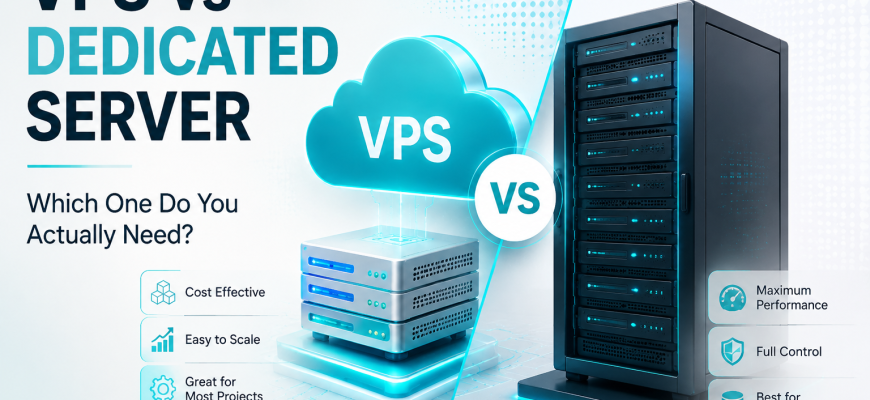
Choosing between a VPS and a dedicated server can be confusing. Both give you far more control than shared hosting, both can run Linux, Docker, databases, websites, and applications — but they are fundamentally different types of infrastructure.
The biggest difference is simple: a VPS gives you virtualized resources from a physical host, while a dedicated server gives you the physical machine itself.
That difference affects performance, price, scalability, storage, hardware control, and the types of workloads each option handles best.
Dedicated server = the entire physical server.
- ⚡ Quick Decision
- ☁️ What Is a VPS?
- 🖥️ What Is a Dedicated Server?
- 🏗️ VPS vs Dedicated: Architecture
- 📊 VPS vs Dedicated Server: Complete Comparison
- 🚀 1. Performance
- ☁️ VPS Performance
- 🖥️ Dedicated Performance
- 💰 2. Price
- 📈 3. Scalability
- 💾 4. Storage
- 🎛️ 5. Control and Flexibility
- 🛡️ 6. Security and Isolation
- 🛠️ 7. Server Management
- 🎯 Which One Should You Use?
- Small Website
- Growing Store
- Development
- Docker Host
- Large Database
- Personal VPN
- Virtualization Host
- Learning Linux
- 🧭 Decision Matrix
- 🚫 A Common Beginner Mistake
- ✅ Final Decision Checklist
- ❓ Frequently Asked Questions
⚡ Quick Decision
If you only need the practical answer, start here.
- Small and medium websites
- WordPress hosting
- Linux learning
- Development and staging
- VPN servers
- APIs and bots
- Small Docker environments
- Projects that need easy scaling
- Sustained CPU-heavy workloads
- Large databases
- Large RAM requirements
- Custom storage configurations
- Virtualization hosts
- Many virtual machines
- Predictable physical resources
- Full hardware control
For most beginners and smaller projects, start with a VPS. Move to dedicated hardware when monitoring and real workload requirements give you a measurable reason to do so.
☁️ What Is a VPS?
A Virtual Private Server (VPS) is a virtual machine running on a physical server.
A virtualization platform divides the resources of the physical host among multiple isolated virtual machines.
Each VPS can have its own:
From an administrator’s point of view, a VPS behaves much like a normal Linux server. You can connect over SSH, install software, configure Nginx, deploy Docker containers, create databases, manage users, and configure networking.
The important difference is underneath: the physical hardware is shared with other virtual machines.
Start with our What Is a VPS? A Complete Beginner’s Guide →
🖥️ What Is a Dedicated Server?
A dedicated server is an entire physical machine assigned to one customer or organization.
Its processors, RAM, storage devices, and network interfaces are not divided into unrelated customer VPS instances.
Dedicated hardware also gives administrators greater freedom over storage layouts, RAID, virtualization platforms, operating systems, and hardware-dependent workloads.
🏗️ VPS vs Dedicated: Architecture
📊 VPS vs Dedicated Server: Complete Comparison
🚀 1. Performance
Performance is one of the biggest reasons organizations eventually move from virtual servers to dedicated hardware.
☁️ VPS Performance
A VPS receives virtual CPU, memory, storage, and networking from a larger host. Modern virtualization can deliver excellent performance for normal websites, APIs, VPN servers, development environments, and many production applications.
However, the physical infrastructure underneath the VPS may still be shared with other virtual machines.
🖥️ Dedicated Performance
With dedicated hardware, the physical processors and memory belong to your server environment. Unrelated customer VMs are not competing for those same physical CPU resources.
This makes dedicated servers particularly attractive for sustained and predictable workloads.
A dedicated server is not automatically faster than every VPS. A modern VPS on a current high-performance CPU and fast NVMe storage may outperform an old dedicated machine. Compare actual hardware, limits, and workload behavior — not only the server type.
💰 2. Price
Price is one of the biggest advantages of VPS hosting.
Because one physical host can run multiple virtual machines, infrastructure costs are distributed across customers.
The important metric is not simply the monthly price. It is the cost of obtaining the resources your workload actually requires.
📈 3. Scalability
VPS infrastructure is generally easier to scale vertically.
4 GB RAM
8 GB RAM
16 GB RAM
Depending on the provider, upgrading a VPS can be as simple as selecting a larger plan and rebooting the virtual machine.
Dedicated server upgrades may require installing physical memory, adding disks, replacing hardware, or migrating the workload to another machine.
💾 4. Storage
A VPS normally sees virtual disks. Underneath them may be local NVMe drives, RAID arrays, SAN storage, distributed storage, or another provider-managed platform.
For most websites and applications, that is completely sufficient.
Dedicated servers become particularly useful when you need specific physical storage configurations.
🎛️ 5. Control and Flexibility
Both VPS and dedicated servers commonly provide root or administrator access.
Root gives you extensive control over the operating system. It does not necessarily give you control over the physical platform underneath it.
On a VPS, you generally cannot replace physical disks, change the host CPU, configure the host RAID controller, or choose how other virtual machines use the physical server.
Dedicated hardware gives you considerably more control over those physical components.
🛡️ 6. Security and Isolation
Dedicated hardware provides physical machine isolation from unrelated hosting customers. That can matter for certain security architectures, compliance requirements, or specialized workloads.
But dedicated hardware does not automatically make an operating system secure.
A properly maintained VPS can be more secure than a poorly configured dedicated server.
🛠️ 7. Server Management
From the Linux administrator’s perspective, managing a VPS and managing a dedicated server can look surprisingly similar.
🎯 Which One Should You Use?
The easiest way to decide is to start with the workload.
Small Website
Dedicated hardware is normally unnecessary for a small website or blog.
Growing Store
Start virtual and move when real traffic and database requirements justify it.
Development
Fast deployment and low cost make VPS instances ideal for testing and staging.
Docker Host
Small container stacks fit a VPS. Heavy environments may justify dedicated hardware.
Large Database
Large RAM capacity and predictable CPU and storage performance can become valuable.
Personal VPN
A small VPS is usually sufficient for WireGuard, OpenVPN, and similar services.
Virtualization Host
Physical hardware provides greater control over CPU, RAM, storage, and the hypervisor.
Learning Linux
Cheap, disposable, remote, and ideal for learning real server administration.
🧭 Decision Matrix
🚫 A Common Beginner Mistake
More hardware is useful only when your workload can actually use it.
A lightly loaded website does not become dramatically better simply because it runs on a machine with 128 GB of RAM. A smaller modern VPS may be faster, cheaper, easier to manage, and easier to scale.
✅ Final Decision Checklist
❓ Frequently Asked Questions
Is a dedicated server always faster than a VPS?
No. Performance depends on CPU generation, clock speed, storage, virtualization, provider limits, and workload. A modern VPS can outperform an older dedicated server.
Can I host multiple websites on a VPS?
Yes. One VPS can host multiple websites as long as its CPU, RAM, storage, and network capacity are sufficient for the combined workload.
Can I run Docker on a VPS?
Yes. Docker is commonly used on VPS instances with compatible virtualization and operating systems.
Do I get root access on a VPS?
Most unmanaged VPS products provide root or administrator access, although the exact policy depends on the hosting provider.
When should I move from VPS to dedicated?
Consider dedicated hardware when measurements show that you consistently need more CPU, memory, storage performance, or hardware control than your VPS platform can reasonably provide.
Is a VPS good for learning Linux?
Yes. A small VPS is one of the most practical environments for learning SSH, users, permissions, services, networking, firewalls, web servers, databases, Docker, and general Linux administration.
Do not choose infrastructure by asking which option sounds more powerful. Choose the smallest platform that comfortably meets your workload, reliability, storage, and performance requirements — then scale when measurements show that you need more.