MINI-COURSE · LESSON 1 OF 3
- Where Does Your n8n Workflow Data Go?
- n8n coordinates the workflow. Its nodes move the data.
- The trigger receives an event
- Nodes work with the data
- An action reaches a destination
- What happens when a form starts an automation?
- Where can n8n workflow data go?
- The n8n environment
- Connected services
- People with access
- Trace the workflow before connecting real data
- Hosting and data flow are different questions.
Where Does Your n8n Workflow Data Go?
Follow an automation from its starting event through each workflow node to the apps and services that receive its data.
The short answer: n8n passes data between connected nodes on the instance running the workflow. When a node calls an external app or API, the data selected for that request can leave the instance. Self-hosting gives you control over the n8n environment; it does not automatically keep every workflow’s data inside it.
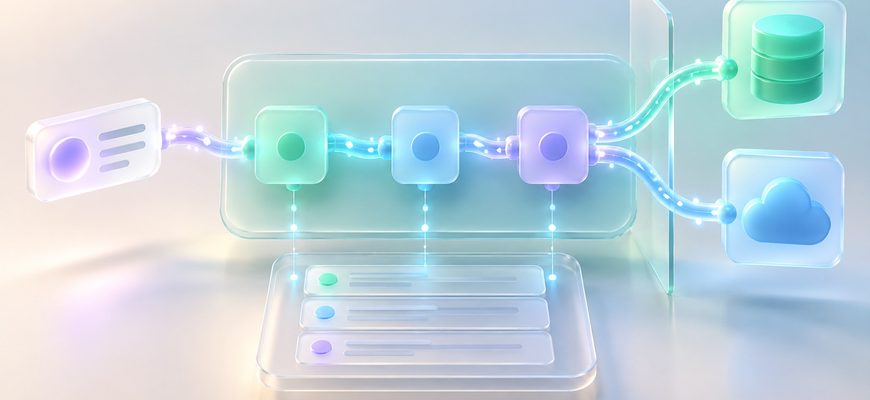
*Execution data saving is configurable. On narrow screens, swipe the diagram horizontally.
n8n coordinates the workflow. Its nodes move the data.
An n8n workflow is a set of connected nodes. One node starts the run; later nodes can read, transform, branch, or send data. n8n passes items from one connected node to the next, so a workflow is both a sequence of actions and a route for information.
The trigger receives an event
A schedule, app trigger, manual run, or webhook can start a workflow. The event supplies the first data the workflow can use.
Nodes work with the data
Nodes can select fields, apply conditions, reshape items, or prepare a request for another service. Each connection carries data forward.
An action reaches a destination
A node may call an API, send a message, or update a record. The destination receives the fields included in that operation.
Data passed between nodes is organized as items, commonly containing JSON fields and sometimes binary data such as files. This structure lets you map a field from an earlier step into a later one. See n8n’s guide to data structure and data flow .
What happens when a form starts an automation?
Imagine a form submission starts a workflow. The trigger receives the submission, a node checks whether the email field is present, and another node creates a contact in a CRM. This example explains the route; it is not a report of a test performed on a live n8n instance.
| Step | What happens | Question to ask |
|---|---|---|
| Form → trigger | The incoming event gives the workflow fields such as a name and email. | Which fields does the trigger receive? |
| Trigger → logic | A condition checks or routes the incoming item. | Does every field need to continue? |
| Logic → CRM | The CRM node sends selected fields using its configured authentication. | Which data is sent to the CRM? |
| Run → history | Execution records may be saved according to workflow and instance settings. | What is saved, and for how long? |
Where can n8n workflow data go?
The n8n environment
This is where the workflow runs. Depending on configuration, the instance can also retain execution data for viewing, troubleshooting, or retries.
Connected services
Each app or API node may send selected information to another provider. Check the node’s operation and field mapping to see what leaves the instance.
People with access
Team members may be able to view workflows and execution details according to their roles and project permissions.
Credentials are separate from the data fields in a workflow. n8n uses credentials to authenticate with services and encrypts them before saving them to its database. That protects stored secrets; it does not determine which workflow fields a node sends to an external service. Read about n8n’s credential encryption key.
Trace the workflow before connecting real data
- Start at the trigger. Identify what event starts the workflow and what information arrives with it.
- Follow every connection. Check what each node reads, changes, filters, or forwards.
- Inspect external calls. List the apps, APIs, and AI services that receive workflow data.
- Review execution settings. n8n lets you choose which execution data to save and configure pruning of older records. See the guide to managing execution data.
- Check who can view runs. Workflow access and execution visibility matter when more than one person uses the instance.
A workflow diagram is a useful privacy map: each connection shows where data moves next. If you cannot explain why a node needs a field, review that mapping before sending production information.
Hosting and data flow are different questions.
n8n runs connected workflow steps in sequence, passing data between nodes. Self-hosting determines where the n8n instance runs; the workflow’s nodes determine which outside services receive requests. Before relying on an automation, trace its trigger, data transformations, external destinations, and saved execution history.
You can now read a workflow as a data map: what enters, what changes, what leaves, and what may be retained.