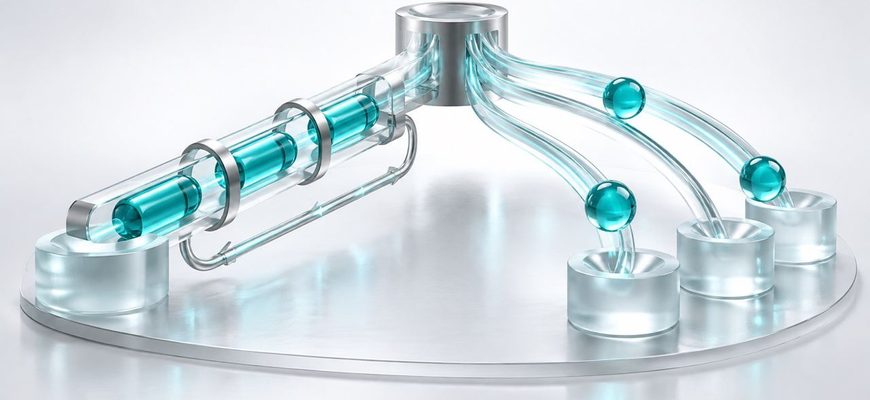
TCP and UDP both carry application data across IP networks, but they make a different promise. TCP protects an ordered conversation. UDP delivers independent messages with very little protocol machinery.
TCP creates a connection and presents applications with a reliable, ordered byte stream. It numbers data, acknowledges receipt, retransmits missing data, and controls how quickly it sends. UDP sends separate datagrams without creating a TCP-style connection or guaranteeing delivery, order, or duplicate protection.
Choose TCP when missing or reordered data would break the result. Choose UDP when message boundaries and timely delivery matter more than recovering every lost packet, or when the application implements the behavior it needs itself.
- What You’ll Learn
- TCP vs UDP: Start with the Promise
- How TCP Works
- How UDP Works
- TCP vs UDP Comparison
- Is UDP Faster Than TCP?
- When Applications Choose TCP or UDP
- A practical decision sequence
- Ports, Sockets, and the Same Number
- Mini Lab: Inspect TCP and UDP on Linux
- Common TCP and UDP Mistakes
- Knowledge Check
- Continue Learning
- Official References
What You’ll Learn
- The practical difference between a byte stream and a datagram.
- What TCP reliability actually does for an application.
- What UDP leaves for the application to decide.
- Why UDP is not automatically “faster” in every situation.
- How ports and sockets fit both protocols.
- How to inspect TCP and UDP sockets on Linux safely.
TCP vs UDP: Start with the Promise
The easiest way to understand TCP vs UDP is to stop thinking about famous port numbers for a moment. Both protocols sit above IP and below application protocols. IP moves packets between hosts. TCP or UDP determines what kind of delivery service an application receives.
TCP promises an ordered stream of bytes. If an application writes data in a particular order, the receiving application reads that stream in the same order. When network loss occurs, TCP can retransmit missing data before presenting the completed sequence.
UDP promises much less. An application gives UDP one message, called a datagram, and UDP sends it toward a destination address and port. That datagram may arrive, arrive more than once, arrive after another datagram, or fail to arrive. The receiving application gets separate messages rather than one continuous stream.
This model builds on two earlier lessons: IP addresses identify hosts and interfaces, while ports and sockets identify application endpoints.
How TCP Works
Before normal application data flows, TCP establishes state at both endpoints. The familiar three-way handshake exchanges SYN and ACK information so each side can initialize sequence tracking and confirm that the path works in both directions.
After the connection is established, TCP uses sequence numbers to place bytes correctly and acknowledgments to track progress. If data appears to be missing, the sender can retransmit it. TCP also uses flow control so a fast sender does not overwhelm a slower receiver, and congestion control so it responds to conditions on the network path.
The application does not normally manage those individual segments. It reads and writes a stream. That abstraction is useful, but it has one important consequence: TCP does not preserve application message boundaries. If an application writes two pieces of data, the receiver might read them together or in smaller parts. The application protocol still needs a way to frame its own messages.
How UDP Works
UDP does not perform a TCP-style handshake before sending application data. Its header carries source and destination ports, the datagram length, and a checksum. The protocol preserves each datagram as a distinct message, but it does not acknowledge delivery or reorder messages for the application.
This smaller contract is useful when old information quickly loses value. During a voice call, a delayed audio fragment may be less useful than the next live fragment. In a game, the newest position update may matter more than an older one that was lost. A DNS query is small enough that the client can retry if a response does not arrive.
That does not mean applications using UDP must be unreliable. An application can add acknowledgments, retransmission, ordering, encryption, or congestion control when it needs them. QUIC, the transport used by HTTP/3, runs over UDP and implements reliable streams and congestion control above it.
TCP vs UDP Comparison
| Question | TCP | UDP |
|---|---|---|
| What does the application receive? | An ordered byte stream | Separate datagrams |
| Connection setup | Establishes connection state before normal data transfer | No TCP-style transport handshake |
| Delivery guarantee | Retransmits data considered lost while the connection remains viable | No built-in delivery guarantee |
| Ordering | Presents bytes in order | Datagrams may arrive out of order |
| Duplicate handling | Prevents duplicate stream data from being delivered to the application | The application may need to detect duplicate datagrams |
| Flow and congestion control | Built into TCP | Not provided by basic UDP |
| Message boundaries | Not preserved | Preserved per datagram |
| Typical fit | Complete, ordered transfers | Timely messages or application-defined transport behavior |
Is UDP Faster Than TCP?
UDP has a smaller header and does not require TCP’s connection setup, acknowledgment, retransmission, and ordering machinery. That can reduce protocol work and avoid waiting for recovery when an application prefers fresh data.
But “UDP is faster” is too broad to be useful. Performance also depends on network latency, loss, congestion, packet size, application design, encryption, server capacity, and how much reliability the application adds. A poorly designed UDP protocol can perform worse than a mature TCP implementation.
The real question is: what should happen when data is delayed or lost? TCP usually waits and repairs the ordered stream. A UDP application can ignore the loss, retry one transaction, replace old state with new state, or implement its own recovery rules.
When Applications Choose TCP or UDP
These examples are common patterns, not permanent assignments. DNS normally begins with UDP for ordinary queries but can use TCP in defined situations. Modern HTTP/3 uses QUIC over UDP, while earlier HTTP versions normally use TCP. An application’s name alone does not prove which transport a particular connection is using.
A practical decision sequence
- Decide whether every byte must arrive and remain in order.
- Decide whether old data is still valuable after a delay.
- Determine whether the application already implements recovery and congestion control.
- Check network and firewall requirements for the actual protocol in use.
- Measure the complete application behavior rather than comparing header sizes alone.
Ports, Sockets, and the Same Number
TCP and UDP have separate port-number spaces. TCP port 53 and UDP port 53 are different transport endpoints even though both are associated with DNS. A firewall rule that permits TCP on a port does not automatically permit UDP on the same number.
A socket combines the transport protocol with local and remote addressing information. A listening TCP socket waits for connection attempts. A UDP socket can receive datagrams without creating one accepted socket per remote peer in the TCP sense.
# Show listening TCP sockets without resolving names
ss -lnt

# Show listening UDP sockets without resolving names
ss -lnu
The option letters are useful to read rather than memorize blindly: -l selects listening sockets, -n keeps addresses and ports numeric, -t selects TCP, and -u selects UDP.
Mini Lab: Inspect TCP and UDP on Linux
This lab only inspects socket information. It does not open ports, change firewall rules, or stop services.
ss -lntLook for the LISTEN state. TCP listeners wait for clients to establish connections.
ss -lnuUDP does not have TCP’s LISTEN handshake state. The output shows bound sockets that can receive datagrams.
ss -ntStates such as ESTAB, TIME-WAIT, and SYN-SENT belong to TCP’s connection state machine.
getent services domain
getent services ssh
Results come from the system’s name-service configuration. You may see both 53/tcp and 53/udp for domain, while ssh normally maps to 22/tcp.
For TCP, identify listeners and established conversations. For UDP, identify bound endpoints. The same port number means nothing without the transport protocol and address context.
Common TCP and UDP Mistakes
Knowledge Check
1. What is the central difference between TCP and UDP?
2. Does TCP preserve the boundaries between application writes?
3. Why might real-time audio prefer UDP?
4. Can an application build reliable delivery over UDP?
5. Are TCP port 53 and UDP port 53 the same endpoint?
6. What should you compare before choosing a protocol?
TCP and UDP are different delivery contracts. TCP manages an ordered conversation and repairs missing stream data. UDP carries independent messages and lets the application decide what loss, delay, duplication, and ordering should mean.
Do not choose from the slogan “TCP is reliable; UDP is fast.” Start with the application’s needs. Ask whether every byte must arrive, whether late data still has value, and which layer should own recovery. That answer leads to the right transport model.
Continue Learning
- What Is TCP? How Reliable Network Connections Actually Work
- What Is a Port? TCP and UDP Ports Explained for Beginners
- Ports and Sockets Explained: How Network Applications Communicate
- Linux Firewall Explained: How Firewall Rules Control Network Traffic