A server can have one IP address and still run a website, SSH, DNS, a database, and many other network services at the same time. How does incoming traffic reach the correct program?
That is one of the jobs of network ports.
Understanding ports makes many server concepts easier to reason about: firewall rules, web server configuration, SSH connections, Docker port mappings, troubleshooting, and the difference between an IP address being reachable and a particular service being available.
An IP address identifies a network endpoint such as a host or interface, while a transport-layer port number helps identify the application endpoint for TCP or UDP traffic on that host.
For example, a web service might listen on TCP port 443, while SSH commonly listens on TCP port 22. The same server IP can therefore support multiple network services simultaneously.
A useful mental model is: IP address = which host; port = which network service endpoint on that host.
- What a network port actually represents.
- Why port numbers range from 0 to 65535.
- How TCP and UDP ports differ.
- What “listening on a port” means.
- Why clients also use port numbers.
- How to inspect listening TCP and UDP sockets on Linux.
- Why an open firewall port does not automatically mean a service is running.
- 🌐 What Is a Network Port?
- Web Server
- SSH Server
- DNS Server
- 🏢 Think of an IP Address and Port as an Address and Destination
- 🔌 What Does “Listening on Port 443” Mean?
- 📦 TCP Ports vs UDP Ports
- 🔢 Why Are There 65,536 Possible Port Numbers?
- 🧭 Common Port Numbers You Will Encounter
- 🔄 Servers Are Not the Only Machines That Use Ports
- 🧠 How a TCP Connection Is Identified
- 🔐 Port, Service, and Firewall: Three Different Things
- Port
- Service
- Firewall
- The SSH service must be running
- It must listen on the expected address and port
- Network policy must permit the traffic
- The network path must work
- 🧪 Mini Lab: See Which Ports Are Listening on Linux
- How to Read the Local Address
- 🔍 Listening Does Not Mean Publicly Reachable
- ⚠️ Common Port Mistakes
- 🎯 A Practical Troubleshooting Model
- Identify the protocol
- Verify the service
- Verify the socket
- Check filtering and forwarding
- Test from the correct network location
- 🧩 Put the Pieces Together
🌐 What Is a Network Port?
A network port is a 16-bit number used by transport protocols such as TCP and UDP to identify communication endpoints.
Because the field is 16 bits wide, possible port numbers run from 0 through 65535.
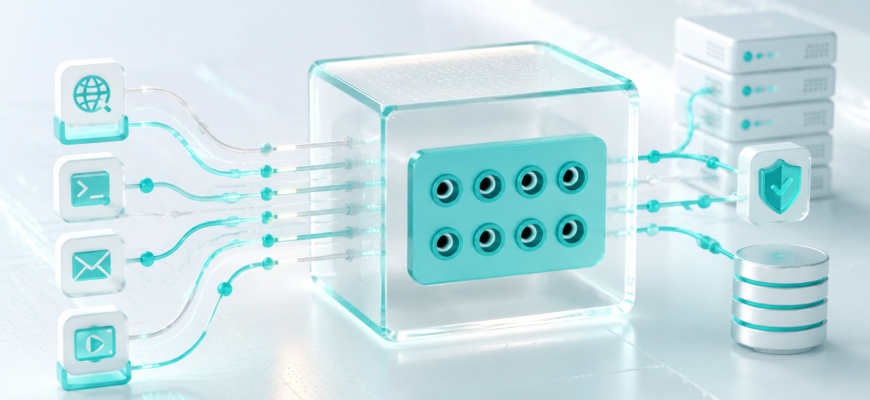
The easiest way to understand why ports exist is to imagine a server with several applications waiting for network traffic.
Web Server
A web service may accept HTTPS connections on TCP port 443.
SSH Server
An SSH daemon commonly accepts remote administration connections on TCP port 22.
DNS Server
DNS uses port 53 and can use both UDP and TCP depending on the operation.
All three services can exist on the same machine and use the same IP address because their traffic can be distinguished by transport protocol and port number.
In this simplified example, the IP address gets the traffic to the relevant host, and the TCP destination port helps the operating system deliver it to the socket associated with the HTTPS service.
🏢 Think of an IP Address and Port as an Address and Destination
A common beginner analogy is an office building.
The IP address is like the building address. It gets you to the correct building.
The port is like information that tells the building where the delivery belongs once it arrives.
| Networking Concept | Simple Analogy | Purpose |
|---|---|---|
| IP address | Building address | Identifies where network traffic is being sent |
| Port | Department or destination inside | Identifies a transport-layer communication endpoint |
| Application/service | People working there | Handles the actual request or protocol |
The analogy is useful, but remember that ports are not physical doors. They are numbers carried in transport-protocol headers and used by the operating system’s networking stack when matching traffic to sockets.
🔌 What Does “Listening on Port 443” Mean?
You will often hear administrators say:
“Nginx is listening on port 443.”
That does not mean the server has opened a physical channel numbered 443.
It means a process has created a network socket and asked the operating system to accept appropriate traffic for a local address and TCP port 443.
If no appropriate socket is listening, there may be no application available to accept that connection even if the host itself is online.
This distinction becomes extremely useful when troubleshooting.
A port number does not automatically mean a service exists. TCP port 443 is conventionally associated with HTTPS, but a program still has to bind and listen appropriately. Applications can also be configured to use non-default ports.
📦 TCP Ports vs UDP Ports
TCP and UDP both use port numbers, but they are different transport protocols.
A port number therefore makes sense together with its protocol. TCP port 53 and UDP port 53 are distinct transport endpoints, even though both are associated with DNS use.
| Feature | TCP | UDP |
|---|---|---|
| Communication model | Connection-oriented byte stream | Datagram-oriented |
| Reliable delivery provided by transport | Yes | No |
| Ordering provided by transport | Yes | No |
| Uses port numbers | Yes | Yes |
| Typical examples | SSH, HTTP/1.1, HTTP/2 | Many DNS queries, NTP |
This is why firewall rules normally specify not just a number such as 53, but also the transport protocol.
Allowing TCP port 53 is not the same rule as allowing UDP port 53.
🔢 Why Are There 65,536 Possible Port Numbers?
TCP and UDP port numbers are 16-bit unsigned values. Sixteen bits provide 65,536 possible values: 0 through 65535.
For assignment purposes, IANA divides the space into three ranges.
| Range | Name | General Role |
|---|---|---|
| 0–1023 | System Ports | Also known as Well Known Ports; assignments are managed by IANA under stricter procedures |
| 1024–49151 | User Ports | Also known as Registered Ports; available for service assignments |
| 49152–65535 | Dynamic Ports | Reserved for dynamic/private use rather than permanent IANA service assignment |
These ranges describe the IANA registry model. They should not be confused with the exact ephemeral-port range chosen by every operating system, because a host can use its own configured local range.
🧭 Common Port Numbers You Will Encounter
You do not need to memorize hundreds of ports. A small set appears frequently in server administration, and you will naturally learn them through use.
| Port | Transport | Common Service Association | What a Beginner Should Recognize |
|---|---|---|---|
| 22 | TCP | SSH | Secure remote login and administration |
| 53 | TCP / UDP | DNS | Domain Name System traffic |
| 80 | TCP | HTTP | Traditional unencrypted web traffic |
| 443 | TCP / UDP | HTTPS | Secure web traffic; modern HTTP can use different transports under HTTPS |
Treat these as standard service associations, not immutable laws. An SSH server, for example, can be configured to listen on a different port.
🔄 Servers Are Not the Only Machines That Use Ports
One of the most common beginner misconceptions is that only servers have ports.
Clients use them too.
Suppose your laptop opens an HTTPS connection to a server. The destination might be:
203.0.113.10:443
But your laptop also needs a local source port for that communication. The operating system normally selects an available temporary port automatically.
192.0.2.20:53024
203.0.113.10:443
Here, 53024 is simply an illustrative client-side port. Your operating system may choose a different value according to its configuration and current socket usage.
The important idea is that network communication contains both source and destination port numbers.
🧠 How a TCP Connection Is Identified
Looking only at “port 443” does not fully identify a TCP connection.
A TCP connection can be distinguished by the combination of:
- source IP address;
- source port;
- destination IP address;
- destination port.
The transport protocol is also part of the surrounding networking context.
This explains something that initially seems surprising: a web server can handle many simultaneous connections to the same local TCP port 443.
Different clients — and different client-side ports — allow the operating system to distinguish those connections.
A listening port is not “used up” after one client connects. The listening socket can continue accepting connections while the operating system tracks established TCP connections separately.
🔐 Port, Service, and Firewall: Three Different Things
These concepts are closely related, which is why beginners often merge them into one idea.
Port
A transport-layer number used as part of identifying a communication endpoint.
Service
A program or application functionality that may bind to a socket and receive network traffic.
Firewall
A policy enforcement layer that can allow, reject, or drop traffic according to configured rules.
Suppose you want an SSH server reachable on TCP port 22.
Several separate conditions may need to be true:
The SSH service must be running
A process must actually provide the SSH service.
It must listen on the expected address and port
A service bound only to localhost is not equivalent to one listening on an externally reachable interface.
Network policy must permit the traffic
A host firewall, upstream firewall, security group, router, or another network control may block the connection.
The network path must work
Routing, NAT, addressing, and other network conditions still determine whether the client can reach the service.
“I allowed port 22 in the firewall, so SSH must work.”
A firewall rule only controls traffic according to that firewall’s policy. It does not start an SSH service, make it listen on the correct interface, fix routing, or configure NAT.
🧪 Mini Lab: See Which Ports Are Listening on Linux
Goal: inspect listening TCP and UDP sockets on a Linux system without changing its configuration.
The Linux ss utility displays socket information. The following command requests listening TCP and UDP sockets and shows numeric addresses and ports:
ss -tulnThe options mean:
- -t — show TCP sockets;
- -u — show UDP sockets;
- -l — show listening sockets;
- -n — show numeric addresses and port numbers instead of resolving service names.
You may see output containing local addresses such as:
0.0.0.0:22
127.0.0.1:5432
[::]:443
These lines are illustrative. Your system will show the sockets that actually exist on your machine.
How to Read the Local Address
The address before the colon matters just as much as the port.
| Example | Basic Interpretation |
|---|---|
| 127.0.0.1:5432 | An IPv4 socket bound to the loopback address; it is intended for local-host communication rather than direct access through another host interface. |
| 0.0.0.0:22 | An IPv4 wildcard bind, generally meaning the socket accepts connections addressed to the host’s applicable IPv4 local addresses. |
| [::]:443 | An IPv6 wildcard bind. Exact IPv4 interaction can depend on operating-system and socket configuration. |
This is why saying only “port 5432 is open” can hide important information. The bind address, protocol, firewall policy, and network path all matter.
🔍 Listening Does Not Mean Publicly Reachable
The ss command shows the local socket state of the machine on which you run it.
It does not prove that a remote user on the Internet can reach that socket.
Traffic may still encounter:
- a host firewall;
- a provider firewall or cloud security policy;
- NAT without the required forwarding rule;
- routing problems;
- an upstream network filter;
- another middlebox between the client and server.
Troubleshoot from layers of evidence. First ask whether the service is running. Then verify what address and port it is bound to. After that, investigate firewall policy and the network path. This is much more reliable than repeatedly changing firewall rules at random.
⚠️ Common Port Mistakes
Network ports such as TCP 443 are logical protocol values. They are unrelated to physical Ethernet, USB, or switch ports.
443 has standard service associations, but software configuration determines what actually uses a local port. A port number alone does not inspect or guarantee the application protocol.
They use the same numeric value but belong to different transport-protocol namespaces. Firewall and socket configuration must distinguish the protocol.
Clients also use source ports. Temporary client-side ports help operating systems distinguish simultaneous communications.
A listening socket only proves that the local system has a socket ready for relevant traffic. Firewalls, NAT, routing, and bind addresses can still prevent remote access.
🎯 A Practical Troubleshooting Model
When someone tells you, “The port isn’t working,” that description is too vague to diagnose the problem.
Instead, work through a short sequence.
Identify the protocol
Are you troubleshooting TCP or UDP? The number alone is not enough.
Verify the service
Confirm that the expected application is actually running.
Verify the socket
Check whether the service is bound to the expected port and address.
Check filtering and forwarding
Inspect relevant firewall, security-policy, and NAT configuration rather than assuming the application is at fault.
Test from the correct network location
A service reachable from localhost may still be unreachable from another machine. Test from a location that matches the path you actually care about.
🧩 Put the Pieces Together
Imagine a VPS running an HTTPS website and SSH.
The machine has the example IP address 203.0.113.10.
| Destination | Likely Purpose in This Example |
|---|---|
| 203.0.113.10:22 / TCP | SSH service |
| 203.0.113.10:443 / TCP | HTTPS web service |
Both connections reach the same server IP.
Their destination ports differ, allowing the operating system to match incoming TCP traffic to the appropriate listening sockets.
That simple idea is the foundation for understanding much more advanced topics: reverse proxies, container port publishing, NAT, load balancers, firewall policies, Kubernetes Services, and network troubleshooting.
- If two services use the same server IP address, how can TCP traffic be delivered to the correct service?
- Are TCP port 53 and UDP port 53 the same transport endpoint?
- What does it mean when a service is “listening on TCP port 443”?
- Why does a client need a source port when connecting to a server?
- If ss -tuln shows a listening socket, does that prove the service is reachable from the Internet?
- Why is “I opened the port in the firewall” not enough to prove that a service should work?
🎓 Check Your Answers
- The destination TCP port is part of the information the operating system uses to match incoming traffic to the appropriate socket. This allows multiple TCP services to share the same server IP while listening on different ports.
- No. TCP and UDP have separate port namespaces. The numeric value 53 can be used with both protocols, but TCP 53 and UDP 53 represent different transport endpoints.
- It means a process has a TCP socket bound so that the operating system can accept appropriate connection attempts directed to that local address and port.
- The source port helps identify the client’s side of the communication. Combined with source and destination IP addresses and the destination port, it allows simultaneous communications to be distinguished.
- No. A local listening socket does not prove end-to-end reachability. A firewall, NAT configuration, routing problem, bind address, provider policy, or another network device can still prevent remote access.
- A firewall rule only affects traffic filtering according to that firewall’s configuration. The application must still be running and listening correctly, and the network path, addressing, routing, and any required NAT must also work.
Think of network communication as more than an IP address. The IP gets traffic to the relevant host; TCP or UDP plus a port number helps identify the transport endpoint that should handle it.
When troubleshooting, never ask only whether a port is “open.” Ask which protocol you mean, which process is listening, which address it is bound to, what the firewall permits, and whether the complete network path can actually reach that service.