Your WordPress dashboard says everything is up to date. That does not tell you whether the PHP runtime serving your website has received the PHP2Shell security fixes.
PHP published emergency security releases on October 21 for CVE-2026-109618 and CVE-2026-109619. The problem is in PHP itself, so a fully updated application can still be running on an affected runtime. The task for a site owner is to identify that runtime, confirm its vendor’s fix and make sure the serving processes have been replaced.
- Why PHP2Shell sits below the WordPress update screen
- Check the website before checking the terminal
- If you administer the Linux server
- Compare the right release, package or image
- A patched CLI can coexist with an unpatched website
- Who needs to apply the fix?
- A useful question for your hosting provider
- For Docker: a restart is not an image update
- Apply the update, then verify the working site
- Three checks before you close the issue
- Sources and verification scope
Why PHP2Shell sits below the WordPress update screen
WordPress is application code. PHP is the software that executes that code. A hosting company, operating-system package manager or container image usually supplies PHP separately from WordPress.
The researchers describe PHP2Shell as memory-safety vulnerabilities in PHP’s request handling. They demonstrated unauthenticated remote code execution against WordPress, Drupal and Joomla, but those applications are not a requirement for every attack path. See the researchers’ explanation of the affected layer.
This distinction determines who can fix the problem. A WordPress administrator may control plugins while the hosting provider controls PHP. On a self-managed VPS, the same person may be responsible for both.
php -v
Reports the PHP executable selected in this shell
It may be a different installation.
Check the website before checking the terminal
Sign in to the WordPress installation you want to inspect. Open Tools → Site Health → Info and expand Server. The WordPress documentation explains this screen.
Record the PHP version and
PHP SAPI. SAPI identifies the interface through
which PHP runs, such as fpm-fcgi. WordPress obtains
these values from its current PHP execution environment; its
server-information implementation
shows the fields.
This is evidence from that installation’s administration request, not an inventory of every server behind the domain. A load-balanced site, separate admin backend or several hosting accounts may need additional checks. Ask the operator to confirm coverage across all serving instances.
If you administer the Linux server
These commands inspect the command-line installation without changing packages or services:
command -v php
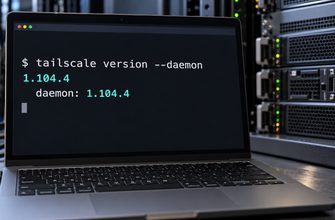
php -v
php --ini
They show the selected executable, its version and the configuration files it loads. The PHP command-line reference documents the options. A “command not found” result does not mean the website has no PHP; the web runtime may be elsewhere.
Compare these results with Site Health. A mismatch means you have found separate environments to investigate. Matching version numbers still do not prove that every web worker has been replaced after an update.
On a systemd-based host, this read-only command can help locate common service units:
systemctl list-units --type=service --all 'php*-fpm.service' 'apache2.service' 'httpd.service'The list is not exhaustive: containers, custom unit names and other web runtimes may not appear. Identify which service and configuration actually serve the domain before planning a restart. Our guide to systemctl explains service state and the difference between reload and restart.
Compare the right release, package or image
The PHP project’s October 21 releases fixed the original two PHP2Shell CVEs at the following upstream versions. These are historical fix points, not a recommendation to stop updating there. Follow newer applicable security releases and your vendor’s advisories.
| Source of PHP | Fix point or example | How to interpret it |
|---|---|---|
| Upstream PHP 8.2 | 8.2.35 |
The PHP project’s October 21 security releases. Check for subsequent updates in the same supported branch. |
| Upstream PHP 8.3 | 8.3.36 |
|
| Upstream PHP 8.4 | 8.4.27 |
|
| Upstream PHP 8.5 | 8.5.12 |
|
| Ubuntu 24.04 vendor package | 8.3.6-0ubuntu0.24.04.13 |
Ubuntu lists this build as fixed for the original two CVEs. The upstream-looking portion remains 8.3.6. |
Sources: PHP’s October 21 advisory and Ubuntu’s package guidance. The Ubuntu example applies to Ubuntu’s package, not every third-party PHP repository.
For Ubuntu, record the complete installed package version and compare it with the advisory for that release. For another distributor, hosting control panel or extended-support vendor, use its own package information. Do not declare an older-looking PHP version vulnerable solely from the short version string.
If your branch no longer receives upstream updates, establish whether your vendor supplies supported security backports. An abandoned runtime without a supported fix needs a migration plan.
A patched CLI can coexist with an unpatched website
Consider this hypothetical deployment, using upstream builds without vendor backports:
- The shell selects PHP
8.3.36. -
The WordPress domain still points to an older PHP 8.2 FPM
pool running
8.2.34. -
The administrator checks
php -vand assumes the website received the fix.
The command reported the shell’s PHP correctly. It answered a narrower question than the administrator intended.
The corrective action is to update the PHP 8.2 environment that serves the domain, replace its workers through the supported procedure and verify the website afterward. Changing the default CLI executable would leave the original mismatch unresolved.
Who needs to apply the fix?
| Setup | Responsible operator | What to confirm |
|---|---|---|
| Managed WordPress or shared hosting | Hosting provider | The PHP build assigned to your domain is fixed, and all serving workers have been replaced. |
| Self-managed VPS | You or your server administrator | The relevant PHP packages are updated, the correct runtime is restarted, and site checks pass. |
| Container deployment | Deployment owner | The replacement image contains the fix and new containers are serving traffic on every replica. |
A useful question for your hosting provider
For this domain, please confirm whether the PHP runtime includes fixes for CVE-2026-109618 and CVE-2026-109619. Which package build or image provides the fixes, and have all serving PHP workers been replaced since the update?
This asks for evidence tied to your website. “WordPress is current” or “our firewall is enabled” does not answer it.
For Docker: a restart is not an image update
Docker reported updated PHP Official Images and Hardened Images on October 22. See its PHP2Shell response.
A container built from an older image does not acquire new image contents merely because that tag was updated in a registry. Restarting that container starts the existing container again; it does not deploy a replacement image. The Docker restart reference describes that operation.
Use your deployment workflow to obtain or rebuild a patched image, test it, and recreate or roll out the affected workloads. Verify the deployed image identity and PHP runtime across replicas. Updating PHP on the host does not update PHP packaged inside the application image.
Apply the update, then verify the working site
- Capture the current setup. Record the domain, web runtime, full package build or image identity, and the operator responsible.
- Prepare recovery and compatibility checks. Verify backups and a usable recovery route. Test the supported update against the site’s important functions. Use the Linux server change checklist when planning VPS maintenance.
- Apply the vendor-supported update. A security update within a supported branch may avoid a major-version migration. Do not switch branches merely to make the displayed number look newer.
- Replace the serving processes. Follow the provider’s procedure for FPM, Apache or the actual runtime; for containers, deploy the updated image. Ubuntu explicitly notes that affected applications may still need restarting after package updates.
- Check function and coverage. Recheck the website’s runtime information and vendor package evidence. Test login, normal pages, uploads and checkout if present. Confirm all replicas and inspect service logs for new failures. Our journalctl guide covers systemd service logs; other platforms may log elsewhere.
If recovery returns you to a vulnerable runtime or image, record the renewed exposure and arrange another supported remediation. A rollback restores service behaviour; it does not preserve a security fix that the old build lacks.
PHP’s advisory treats configuration workarounds as partial protection for specific paths. Follow current vendor guidance if you cannot update immediately, and consider restricting access or taking the affected service offline while remediation is arranged. Do not treat a WAF, a quiet log or a WordPress security plugin as proof that PHP is patched.
Three checks before you close the issue
Does the evidence describe this website’s PHP?
Record the web runtime and domain mapping. A terminal version check alone does not identify the PHP environment serving the site.
Does the vendor confirm the actual build is fixed?
Use the complete package version or image identity. Account for supported vendor backports and current follow-up advisories.
Have the serving workers or containers been replaced?
Confirm that the update is active across the deployment and that normal site functions still work. Installed files and a downloaded image are incomplete evidence on their own.
Sources and verification scope
- PHP’s dated security announcements — October 21 releases and October 23 follow-up.
- PHP2Shell research — affected layer and demonstrated applications.
- Ubuntu’s PHP2Shell update guidance — fixed package builds and process replacement.
- Docker’s PHP2Shell response — updated image availability.
- WordPress Site Health documentation — locating information about the site’s environment.
Guidance checked October 30, 2026. The deployment example is hypothetical. No exploit reproduction, production-server scan or Linux runtime test is claimed. Consult current advisories before changing a live site.